How to Use Electric Hoist Remote Effectively and Safely?
In today’s fast-paced industrial landscape, the effective and safe use of Electric Hoist Remotes is critical. According to a report by the International Organization for Standardization (ISO), improper operation of lifting equipment contributes to 25% of workplace accidents. These numbers highlight the importance of understanding remote operations in hoisting machinery.
Expert John Smith, a leading safety consultant in the hoisting industry, emphasizes, "Training on Electric Hoist Remotes is essential to prevent accidents.” His insight sheds light on the necessity of proper training and awareness. Mishandling can lead to serious injuries or equipment damage.
It is essential to familiarize yourself with the remote’s features. Many users overlook basic functions and safety protocols. This negligence can lead to hazardous situations. Ensuring a comprehensive understanding of the Electric Hoist Remote can mitigate risks significantly. Awareness and responsibility are vital in maximizing safety and efficiency in lifting operations.
Understanding the Basics of Electric Hoist Remote Functions
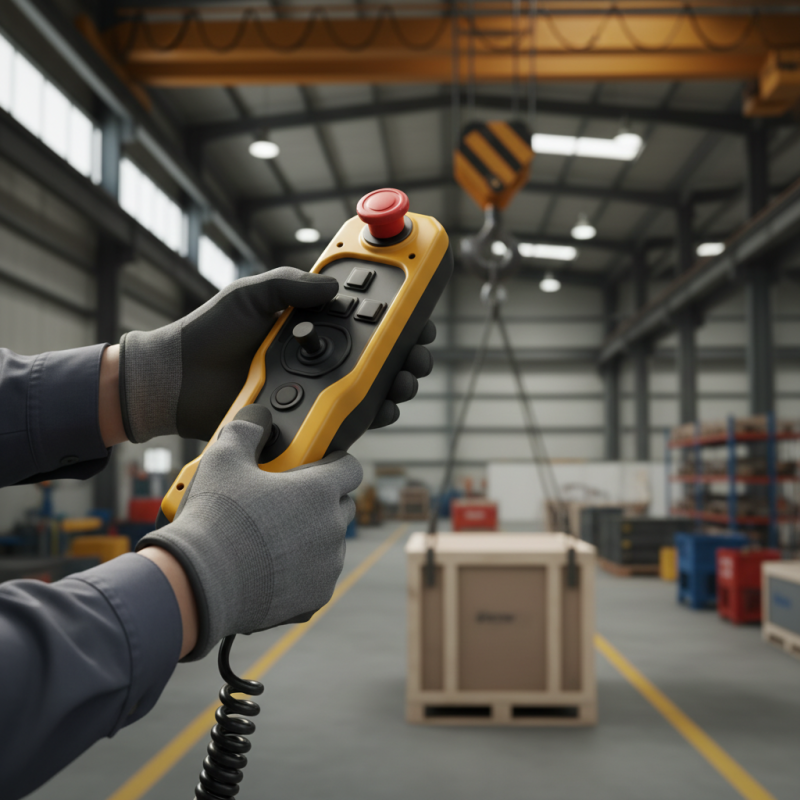
Electric hoist remotes play a crucial role in operating lifting equipment safely and efficiently. Understanding the basic functions of these remotes can enhance your working experience. The remote typically includes buttons for lifting, lowering, and emergency stop. Familiarizing yourself with these controls is essential.
Take time to practice with the remote in a safe area. This step should not be overlooked. Mistakes can happen, and being unprepared might lead to accidents. Test the buttons to see how responsive they are. Look for any signs of wear or damage on the remote. If something feels off, it’s best to pause and inspect it.
Here are some tips for effective usage: Always keep the remote within reach while operating. This ensures quick access in emergencies. Make sure you communicate clearly with your team before starting a lift. Coordination is key, especially in busy work environments. Regularly review the safety protocols, even if they seem tedious. It's easy to forget, but complacency can be dangerous.
How to Use Electric Hoist Remote Effectively and Safely?
| Function |
Description |
Best Practices |
Safety Tips |
| Up/Down Controls |
Controls the vertical movement of the hoist. |
Always use smooth and steady motions. |
Never overload the hoist beyond its rated capacity. |
| Emergency Stop |
Immediately stops all hoist operations. |
Ensure the emergency stop is easily accessible. |
Test the emergency stop function regularly. |
| Limit Switches |
Prevents over-travel of the hoist. |
Regularly check limit switch functionality. |
Do not bypass limit switches. |
| Speed Control |
Adjusts the speed of lifting and lowering. |
Use slower speeds for precision lifts. |
Avoid sudden stops at high speeds. |
| Directional Controls |
Controls horizontal movements of the hoist. |
Plan the path before moving the load. |
Clear the area of obstacles before moving. |
Essential Safety Precautions When Operating Electric Hoist Remotes
When operating an electric hoist remote, safety is paramount. Always inspect the equipment before use. Check for frayed cables and damage. Ensure all components are functioning properly. Neglecting these steps can lead to accidents.
While operating the remote, maintain a clear line of sight. This helps you monitor the load and surroundings. Be cautious about distractions. A sudden lapse in attention can be dangerous. Use spotters if necessary. They can alert you to unseen hazards.
Familiarize yourself with emergency procedures. Knowing how to stop the hoist quickly is essential. Practice this regularly. Situations can change fast. Lastly, never exceed the load capacity. Doing so can result in catastrophic failures. Reflect on your practices often to improve safety.
Common Mistakes to Avoid When Using Electric Hoist Remotes
Using an electric hoist remote can boost efficiency, but mistakes can lead to accidents. One common error is not checking the remote before use. Always inspect the buttons and cables. Even a small crack can cause problems. Neglecting this step may result in unexpected failures.
Another mistake is overcrowding the space. It’s crucial to keep the area clear of obstacles. If the area is cluttered, operating the hoist safely becomes challenging. Workers might not see warning signals, and that can be dangerous. Moreover, failing to communicate effectively with team members can lead to misoperations. Clear signals and calls should be established beforehand.
Lastly, ignoring the manufacturer’s guidelines is a big no. Users often think they can wing it. Skipping instructions leads to misuse and potential harm. Electric hoist remotes are designed with specific functions in mind. Abiding by these guidelines is essential for safe operation. It’s better to be cautious than sorry when it comes to equipment safety.
Common Mistakes in Using Electric Hoist Remotes
Maintenance Tips for Ensuring Safe Operation of Electric Hoist Remotes
When using electric hoist remotes, safety is paramount. Regular maintenance ensures these devices work efficiently. Start by inspecting the remote for any signs of wear or damage. Check the buttons to ensure they respond correctly. Dust and debris can obstruct functionality, so keep the device clean.
Battery life is crucial for smooth operation. Replace batteries regularly to avoid sudden failures. A weak battery may cause delays or malfunction. It's essential to have spare batteries on hand, especially in critical situations. Pay attention to the charging indicators. If they show erratic behavior, it might be time for a replacement.
Consider environmental factors. Humidity, dust, and extreme temperatures can impact the remote's performance. Store the remote in a dry, temperature-controlled area when not in use. However, despite these precautions, accidents can still happen. Reflecting on past incidents can provide learning opportunities for better practices. Regularly train operators on safety protocols and procedures to minimize risks.








 Ms.Lily International Sales Director
 Join 3S Group
